

Gallery
The challenge
GBL Rental Express rents scooters, motorbikes and cars in Brisbane, short and long term. The fleet is tracked on Traccar, the open-source GPS tracking server. Traccar is good at the tracking half of the job: live positions, trips, stops, geofences, alarms and replay. It has no idea about the rental half. There's no licence plate or chassis number on a device, no customer number, and no rental contract that can expire. For a rental operator the question that matters is usually "whose contract has run out, and where is that vehicle right now?" Stock Traccar can't answer it, so the answer lived outside the tracking system.
Architecture
- Trackers → Traccar server. Vehicles report to a Traccar server. TechMania customized the server side: device protocol handling, the API data it returns, the device expiry mechanism, and extra data fields for each device. - Traccar API → GBL web portal. The portal is built on Traccar's React web app and talks to the same Traccar API. The GBL layer (branding, navigation, dashboard, rental fields, expiry views, device actions) is TechMania's frontend work. - Traccar API → iOS app. The GBL Tracking System iOS app, built by TechMania in Flutter, reads from the same backend. - Maps: OpenFreeMap / OpenStreetMap tiles in the portal, with Google Satellite set as the default map in server preferences.
Solution
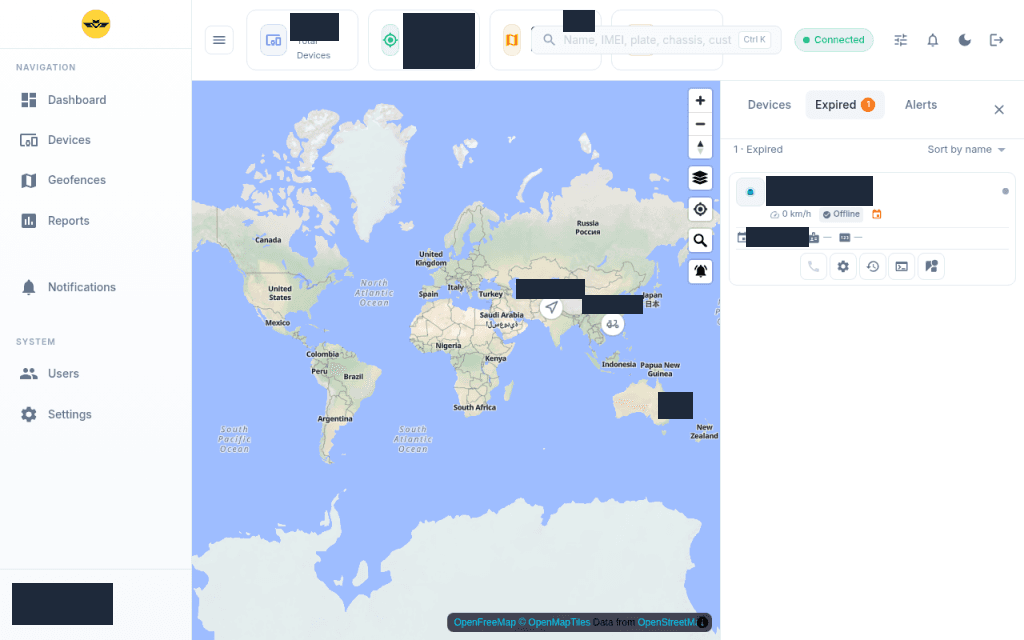
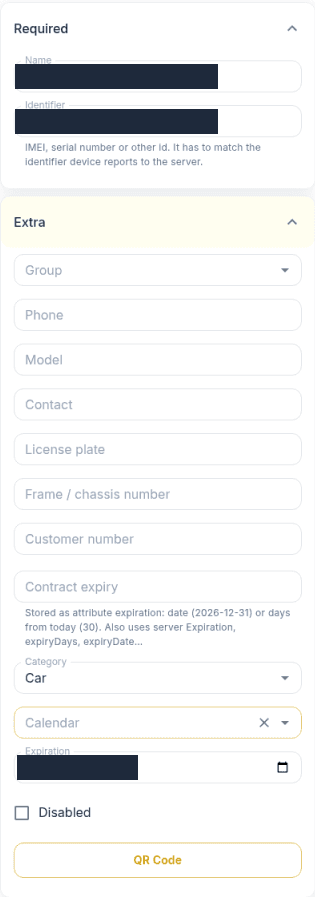
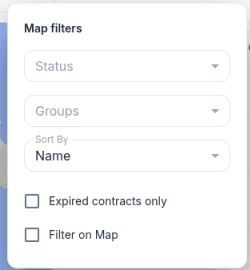
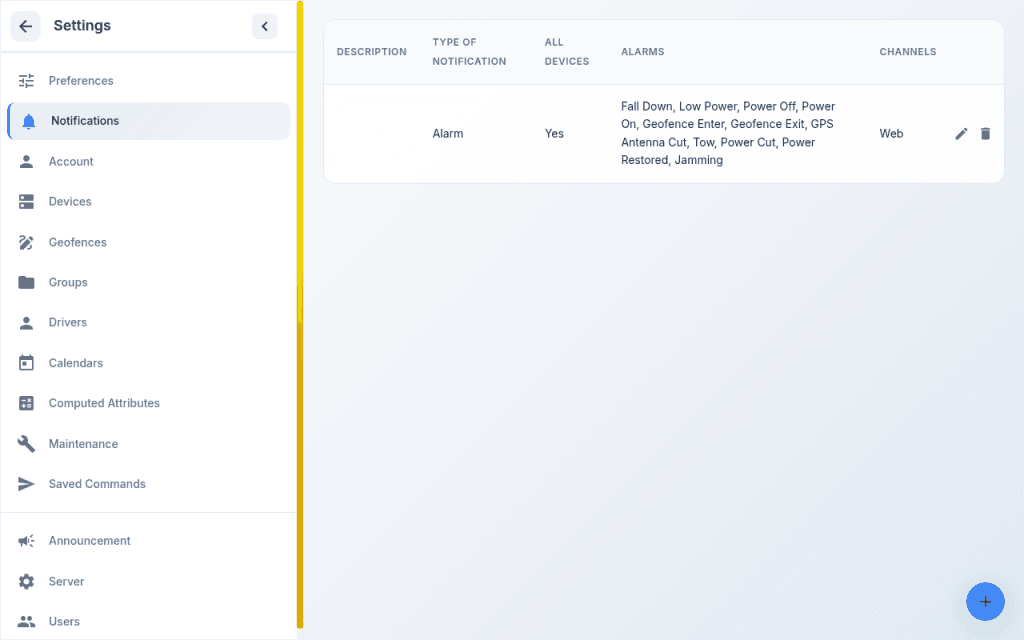
What GBL staff get in the portal: - Expired tab. Next to Devices and Alerts, a tab lists vehicles whose rental contract has expired, with a badge count and a red expiry marker on each card. - "Expired contracts only" filter. A map filter narrows the live map to expired contracts, alongside status, group and sort options. - Rental fields on every device. Licence plate, frame/chassis number, customer number and contract expiry sit in the device form. Contract expiry is stored as an attribute, either a date or a number of days, and the portal also reads Traccar's own expiration date. - One search box for name, IMEI, plate, chassis or customer number. - Device card actions: call, replay, command and Street View, next to speed and status. - GBL-branded shell and dashboard: sidebar navigation (Dashboard, Devices, Geofences, Reports, Notifications, Users, Settings), a search bar with a Ctrl K shortcut, a live connection indicator, theme toggle, and a fleet dashboard with Total Devices, Online Now, Moving and Alerts cards. Standard Traccar features stay available in the same portal: geofences with drawing tools, trips / events / stops / summary / chart reports, route replay, alarm notification rules (power off, power cut, geofence enter/exit, tow, jamming, GPS antenna cut), user admin and server preferences.
Results
- Contract expiry now lives in the tracking system, not beside it: expired rentals are one tab or one filter away on the live map. - Plate, chassis, customer number and contract expiry are stored per device and searchable from one box. - From a device card, staff can call, replay the route, send a command or open Street View without leaving the map. - One Traccar backend now serves both the GBL-branded web portal and the GBL Tracking System Flutter iOS app. Tech stack - Traccar (open-source GPS tracking server, Java), customized backend: device protocols, API data, device expiry mechanism, added data fields - Traccar web app (React, Material UI, MapLibre), extended into the GBL portal - Flutter: GBL Tracking System iOS app - Maps: OpenFreeMap / OpenStreetMap tiles; Google Satellite default layer Next step Running a rental or subscription fleet on Traccar and need it to understand contracts, customers and expiry, not just coordinates? https://techmania.solutions