

French vehicle-rental operators do not usually fail for lack of an ANTAI login.
They fail when fine designation lives in one portal, weekly rent and unpaid balances live in another, and vehicle movement — departure, return, SAV, cleaning — lives in chat or Excel. Under the Art. L121-6 designation clock, plate → contract → driver evidence has to be reconstructable fast. When those pieces sit in four tools, the “ANTAI module” on a sales page does not save Monday morning.
That gap is the industry problem: loueurs and rental SaaS buyers juggle ANTAI fine work separately from movement, weekly billing, and inspections — so designation readiness and unpaid rent stay fragmented.
What buyers actually mean by “ANTAI module”
In public loueur SaaS and adjacent telematics products, “ANTAI” can mean four very different things:
- Record — store a fine row next to a vehicle or contract.
- Link-out / assisted — open or guide the ANTAI gestionnaire-de-parc flow without closing the ops loop inside the Admin.
- Automate / live feed — connect designation or contestation deeper into the product (depth varies by vendor; public claims differ).
- OCR + bulk workbench — ingest fine notices and ANTAI-oriented CSV, assign the driver, retry OCR, handle FPS/contest paths, and archive treated cases.
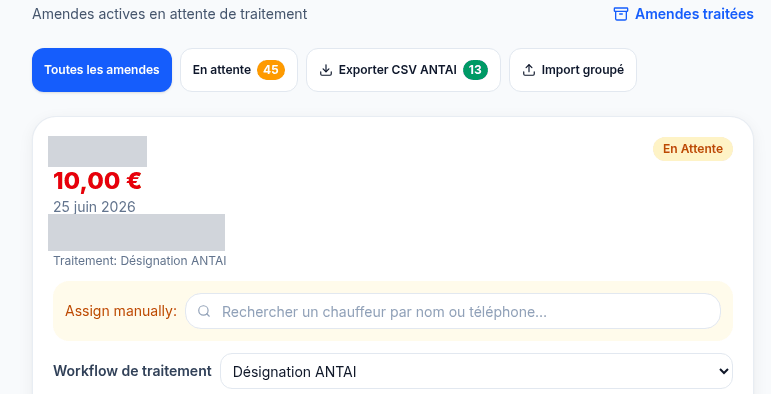
Market language often collapses all four into one checkbox. Buyers then discover that “OCR” on a brochure meant ID or permis scan — not fine-notice OCR that feeds designation. FPS (stationnement) and radar/ANTAI paths are not always the same depth either. Capability claims without a workbench shape leave ops stitching booking CRM + movement SOP + fine tool + Excel.
None of that requires inventing win rates against named vendors. The operational consequence is visible in the workflow: if designation evidence is not next to the rental contract and the weekly invoice, staff rebuild the story under time pressure.
Why weekly billing belongs in the same loop
Short-term and weekly-driver fleets do not only need tourist reservation calendars. They need movement states beside economics:
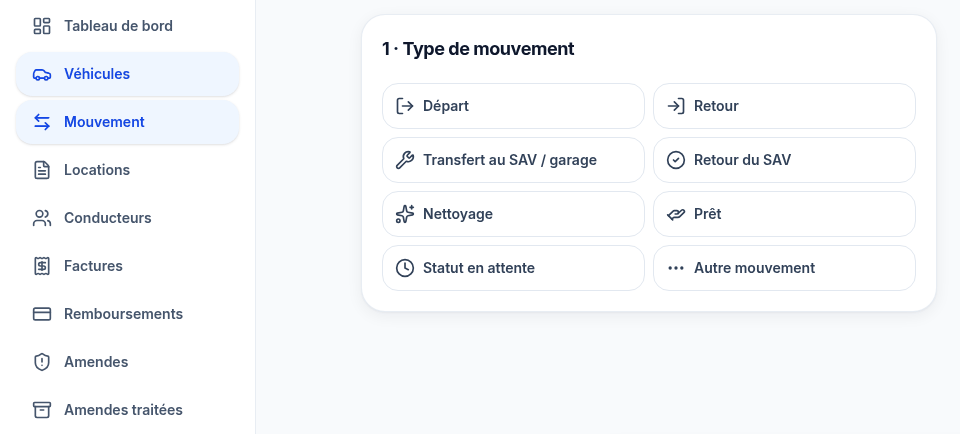
- Vehicles moving through departure / return / SAV / cleaning / loaned / ready
- Weekly rent contracts and unpaid rent / fines / debt visibility
- Departure vs return inspections when disputes drive reimbursements
- Staff roles so ops, SAV, billing, and admin are not one oversized login
When weekly unpaid KPIs live in a spreadsheet while fines live in a portal, idle vehicles and overdue balances stay hidden across tool hops. Designation readiness slips when driver docs or contract match are incomplete — not because the team “forgot ANTAI,” but because the Admin never closed the loop.
What a designation-ready Admin surface looks like
On FleetFlow, a French rental operations admin that TechMania built end to end, the closed loop looks like one workspace:
- Movement — guided vehicle transitions operators actually run every day
- Rentals & drivers — weekly contracts, onboarding, document completeness
- Inspections — departure / return review queues, with automation settings for inspection comparison and OCR
- Weekly invoicing — unpaid rent / fines / debt KPIs, week navigation, Excel import, balances
- Fines workbench — ANTAI CSV export, bulk import, driver assignment, OCR retry, notice download, designation, FPS payment/contest, mark-treated, processed archive with contact shortcuts
- Roles & multi-tenant shell — staff tiers and organization switching so compliance work is not everyone’s inbox
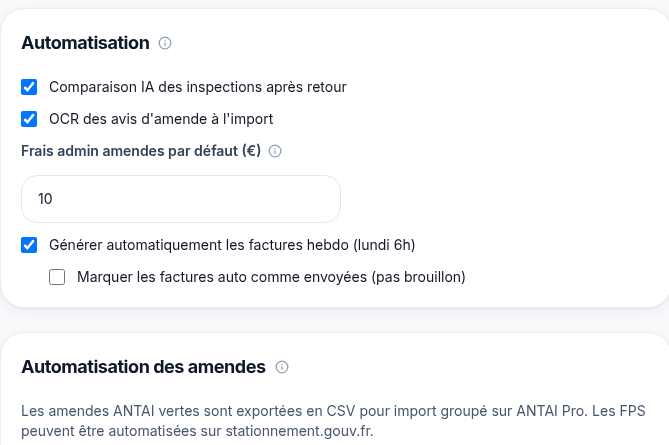
Operators open one Admin: movement → contract → invoice → fine designation → archive. That is a compliance and cash loop — not a portal bookmark.
The same Admin also shows dashboard KPIs (fleet states, weekly revenue, overdue invoices, SAV queue), bulk Excel import for drivers, vehicles, and payments, and French-first localization.
Build vs buy — without the pitch theater
FR loueur CRM (Fleetee / FlotteFacile / Lexio-class), enterprise RMS, and separate fine/telematics tools win when your workflows are standard and you want speed to seat. Seat licenses do not yield owned multi-tenant rental product IP — that is a buy-vs-build fact, not a smear.
Custom rental Admin engineering starts to matter when:
- You need fine-notice OCR + ANTAI CSV bulk inside the same identity model as weekly rent
- Movement SOP vocabulary (departure / return / SAV / cleaning) must sit beside unpaid rent and fines
- Multi-site or multi-company switching and staff roles are how back-office actually works
- Public “OCR” and “ANTAI” labels on packaged SaaS do not match the designation workbench your compliance lead needs under the 45-day clock
That is the shape worth specifying before you buy or build: movement, weekly billing, inspections, and ANTAI/OCR fine designation in one French-first workspace.
Practical next step for ops and technology buyers
Audit one fine that hit this week. Can your back office open the plate, the active weekly contract, the driver evidence, the weekly invoice line, and the designation / OCR / FPS action without leaving the product? If the answer is three portals and a shared drive, the gap is product design — not “more ANTAI training.”
If your rental stack still means an ANTAI checkbox in one place and weekly economics in three others, talk to us about a unified FR rental ops Admin.